
My Robot Vacuum Will Wash Its Own Mop, But Won't Empty Its Own Bin. So I Fixed That. Then I Fixed My Fix.
A $2,000 robot with lasers, a self-washing mop and a dock that empties its own bin, beaten nightly by one Golden Retriever. It'll wash its mop mid-clean but won't empty its bin, so it clogs solid and starts redistributing the dog. My first fix sent it home to empty on a timer. Then I tested it, and found out 'go home' doesn't mean pause. It means quit. Here's the version that works (one room at a time, with the full config), and the hour-long kitchen that nearly made me rip it all out.
I own a robot vacuum that cost about as much as my first car. It has lasers. It mops. It washes its own mop. It drives back to a dock the size of a bar fridge that sucks the dirt out of it like a tiny industrial confession booth. By every line on the spec sheet, it is smarter than me.
It is also, reliably, defeated by my dog.
His name is Sunny. He's a Golden Retriever, a breed best described as a loaf of bread that produces 40kg of hair per fortnight. Run the vacuum for more than about twenty minutes and the bin packs solid with golden fluff, the airflow dies, and the thing stops cleaning the floor and starts, very thoroughly, redistributing the dog across it. Hand-spread. Artisanal.
"No problem," I thought, like a fool. "I'll just tell it to empty the bin partway through a run."
You cannot.
The one setting that doesn't exist
Here is the setting the app does have: wash the mop every X minutes mid-clean. Brilliant. It'll trundle back to the dock partway through, rinse its little mop, and carry on. Timed. Automatic. Exactly the kind of thing you'd want.
Here is the setting the app does not have: empty the bin every X minutes mid-clean.
Read that back. The expensive robot will interrupt itself on a schedule to clean the one thing my hardwood floors do not care about, and flatly refuses to do it for the one thing that would stop it smearing Golden Retriever down the hallway. The dock can empty the bin. It does it enthusiastically the second the robot returns home. It just won't do it on a timer, during a job. That's not a hardware limit. That's a menu someone decided not to build.
So I did the reasonable, well-adjusted thing a father does at 11pm on a Tuesday: I declared war on the app.
The map editor is a hostage situation
First, the polite route. The app lets you name your rooms and clean them individually, and for a long time that worked exactly as advertised. Every room named. Properly. The kitchen was Kitchen, the hall was Hall, the whole house labelled like a tidy little atlas.
Then the map had an episode.
Something set it off, and it redrew the entire floorplan. New borders, a slightly different opinion about where my walls are. And it took every single room name with it. Not scrambled, not corrupted. Just gone, the lot of them, as though I'd never typed a thing.
So I started typing them all back in, which is how I came to have a room in my house called Ganes. I have never been to Ganes. I don't want to go to Ganes. I gave up somewhere around halfway, which is why half my rooms still have no names at all, and why the robot, which clearly knows exactly where everything is, will only tell the app about the four I managed to relabel before I lost the will.
The enthusiast move here is Valetudo: gorgeous open-source firmware that evicts the cloud entirely and gives you a proper local brain. I checked. The vendor had already bolted that door on my exact model; the community root was patched out before my unit shipped. Can't have the people who bought the robot owning the robot.
Fine. We do this the other way.
Going around the app
Every robot like this talks to its own cloud with a documented-by-nobody protocol, and some heroic people have reverse-engineered it into a Python library. I pointed it at my own account, reusing the login my Home Assistant already holds, so no new passwords and nothing bypassed, and asked the robot directly for its map.
Turns out my "eleven-room house" is fourteen segments. Two of them are rooms that don't exist: phantom areas the lasers mapped by peering through the windows and the gap under the back door. My vacuum has been quietly surveying the neighbour's yard. Diligent little guy.
Crucially, the robot doesn't think in names. It thinks in numbers: each room is a segment with an ID. The app's names are just a sticky label on top, and a badly-applied one. So I threw the labels away and kept the numbers. Ganes is dead. Long live The Numbers.
Never let the app's names be the source of truth. Clean by the segment, not the sticker.
Cleaning by the number
Once you're talking in segment IDs, a single room becomes a one-line command:
- action: vacuum.send_command
  target: { entity_id: vacuum.vacuum }
  data: { command: app_segment_clean, params: [20] }   # 20 = Kitchen
Do that for every real room and you get a dashboard full of buttons that actually work, immune to whatever the app decides to call things this week. I also gave the kitchen one a friendlier name, Clean After Cooking, because the dog is also defeated by a dropped sausage, and the fastest way to undo dinner is one tap on the wall tablet.
Attempt one: send it home on a timer
Now the headline act. The robot won't empty itself on a timer, so Home Assistant would do it for it. While the vacuum is cleaning, every fifteen minutes (comfortably under Sunny's twenty-minute clog threshold), send it home, let the dock empty it, and send it straight back out to carry on:
# Attempt one. Do not copy this. Keep reading.
- action: vacuum.return_to_base
  target: { entity_id: vacuum.vacuum }
- wait_template: "{{ is_state('vacuum.vacuum','docked') }}"
- action: switch.turn_on
  target: { entity_id: switch.roborock_s8_pro_ultra_dock_dust_emptying }
- action: vacuum.start        # <- "resume where it left off"
  target: { entity_id: vacuum.vacuum }
The whole trick was that last line. Sending a robot home mid-job pauses it, I told myself, and starting it again resumes from where it stopped. Get that wrong and you've built a machine that quits on a timer and starts the whole house over, which is a worse problem than the one you started with.
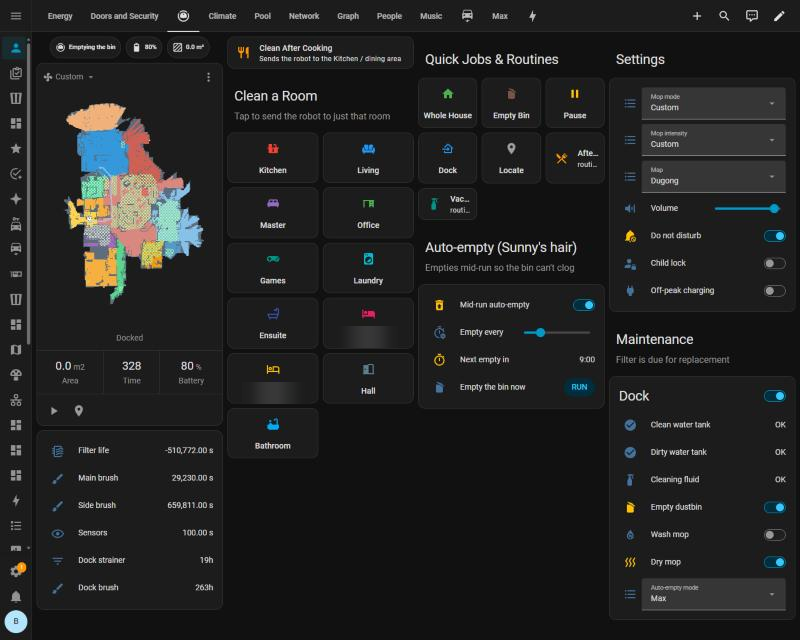
Attempt one's control panel, in happier times. Mid-run auto-empty on, interval on a slider, a countdown to the next one, and a RUN button for the days Sunny has clearly been at it. Every control here works exactly as labelled. It's the assumption underneath them that's wrong. Two room buttons are blurred because they're named after people who didn't ask to be on the internet.
I was very pleased with myself. I even wrote a rule about it.
Then I tested it.
Reader, it does not pause
Tuesday, 5:15pm. Robot halfway through the kitchen. I send it home.
The robot keeps a little internal flag that means "I am on a job". The instant it turned for the dock, that flag dropped to zero. Not paused. Not "back in a sec". Quit. It drove home, docked, and the dock emptied the bin all by itself about seven seconds later. It never needed my "now empty it" command.
My script sent that command anyway. The dock, already busy emptying, threw an error. The error crashed the script before it reached "resume".
Which was lucky. Because "start" on a robot with no job in progress doesn't mean resume. It means begin a brand-new clean of the entire house. I had built, precisely and with great care, the exact machine I'd warned myself about: one that would abandon the kitchen every fifteen minutes and start the whole house again from the top. Forever. Sunny would have been fine with that.
I went and read the fine print. Roborock users and their own manuals agree: send it to the dock mid-clean and the job ends. The only trip home that keeps the job alive is the robot's own low-battery recharge. It's happy to take a break. It just won't let me give it one.
Test the pause before you trust the resume.
Attempt two: one room at a time
Here's the thing I'd missed, staring at it the whole time. When the robot finishes a single-room clean, it goes home on its own. It docks. And the dock empties the bin every time it docks. No interruption needed. No job to cancel.
So stop interrupting long jobs. Make the jobs short.
Home Assistant now keeps a queue. "Whole house" isn't one big job any more. It's a list of rooms, handed to the robot one at a time:
# Whole house: my order, the laundry not invited, ONE room at a time.
- action: script.rr_clean_rooms
  data:
    segments: [19, 20, 29, 26, 16, 23, 24, 18, 27, 22]
    name: Whole House
It sends the first room. The robot cleans it, drives home, docks, and the dock empties it. Home Assistant waits for the dock to finish, checks there's enough battery, and sends the next room. Repeat until the list is empty. Bonus: the rooms now go in exactly my order. You can't "path-optimise" a job that's only one room long.
The clever part is telling "finished a room" apart from "a human stopped it". Both look the same: that "on a job" flag drops.
My first rule was where it drops. A finished room ends on the dock; a kid hitting stop in the app leaves the robot out on the floor. Simple. Elegant. Wrong. On the very first real run the robot finished the kitchen, turned for home to wash its mop, and dropped the flag halfway down the hall. My automation decided someone had stopped it, and cancelled the hall. Robot: 2. Dad: still 0.
So the rule is now what it's doing when the flag drops. Finished rooms drop it on the dock, or on the way home to wash the mop. A human stop drops it with the robot just "returning home", idle, or paused:
# The robot's own "I'm on a job" flag just went off. Done, or stopped?
triggers:
  - trigger: state
    entity_id: binary_sensor.vacuum_cleaning
    from: "on"
    to: "off"
    for: "00:00:15"
actions:
  - variables:
      finished: >-
        {{ is_state('vacuum.vacuum', 'docked') or states('sensor.vacuum_status')
           in ['going_to_wash_the_mop', 'washing_the_mop', 'emptying_the_bin'] }}
  - if: "{{ not finished }}"                    # heading home out of nowhere = a human said stop
    then:
      - action: script.rr_queue_clear           # so drop the rest of the list
      - stop: Stopped by hand
  - wait_template: "{{ states('sensor.vacuum_battery') | int(0) >= 30 }}"
  - action: script.rr_queue_next                # finished: next room
Stop it from the app, the robot's button, or the dashboard, and the queue drops. It doesn't carry on cleaning after you've told it no, which is more than I can say for the dog. Pause still works: the robot holds the room and picks up where it left off, because that's a pause it agrees with.
The app's schedules had to go too
The app was also running two schedules of its own: the kitchen every night at 8pm, and living plus kitchen at 1:30 on Mondays, Wednesdays and Fridays. Those run as one big job and go straight around everything above.
So I pulled them out of the robot with the same library, settings and all, and rebuilt them as Home Assistant schedules. Each one is a weekly grid you can drag on the wall tablet, still on the same suction and mop settings the app used, and it feeds the queue like everything else. The app's versions are getting the bin, which is more than the robot ever did voluntarily.
Keeping score
One room at a time only works if no single room takes longer than Sunny's twenty minutes. I suspected the living room. I didn't know, and I'd been burned by "suspect" once already that day.
So every room now logs itself: how long it took, and the battery at the start and the finish. The logbook forgets after about ten days, so the results also go into the long-term database, where I can point a chart at them in a month and find out which rooms are too big and which ones eat the battery. Decisions get made on numbers, not vibes. The vibes are what got me here.
The first number came back immediately, and it made me panic. The kitchen, on its fancy custom mopping settings, took 66 minutes and 26% of the battery. That's more than three Sunnys.
Then I remembered which rooms actually clog. The kitchen, hall, games room and bathrooms are mop rooms, and the mop rooms have never clogged. They're slow because the robot is mopping, and stopping to wash the mop, not because it's full of dog. The twenty-minute limit only applies to the rooms it just vacuums: the living room, the bedrooms, the office. Those are the numbers I'm actually waiting on.
An hour-long kitchen is fine. A twenty-five-minute bedroom would not be, at least not yet.
Because even that twenty minutes is a dirty-floor number. It's how long the bin lasted when every clogged run left fur behind for the next one to choke on. A robot that empties between rooms actually picks the fur up, so the next run starts on a cleaner floor with less to swallow. If this works, the clog point should creep out on its own. The fix makes its own headroom.
Except nothing measures a clog. The log knows how long each room took and how much battery it ate. It has no idea the bin is packed solid. There is exactly one clog sensor in this house, and it's me, standing in the hallway, watching the robot paint a golden stripe down the floorboards.
So I gave the sensor a button. Bin clogged, on the wall tablet, behind an "are you sure?" so the kids can't log a clog every time they walk past. One tap writes down which room it was cleaning and how long since the bin was last emptied:
# The "Bin clogged" button. Doesn't touch the robot. Just takes notes.
- variables:
    room: >-
      {% from 'vacuum_rooms.jinja' import room_name %}
      {{ room_name(states('input_text.vacuum_queue_current')) }}
    mins: >-
      {{ ((now().timestamp() - state_attr('input_datetime.vacuum_queue_room_started', 'timestamp'))
          / 60) | round(0) | int }}
- event: vacuum_clog                 # a sensor catches this; the database keeps it for good
  event_data: { room: "{{ room }}", minutes: "{{ mins }}" }
- action: logbook.log
  data:
    name: Vacuum queue
    entity_id: sensor.vacuum_queue
    message: "BIN CLOGGED - {{ room }}, {{ mins }} min in"
Every room in the queue starts on a freshly emptied bin, so "minutes into the room" is "minutes since the last empty". If the clog point really does creep out, the chart will show it, and I get to be smug with evidence.
The rules I gave it
Automating a thing that drives around your house unsupervised needs a few adults in the room:
- Never "pause" it by sending it home. That ends the job. So the jobs are one room long, and the dock empties between them.
- Test the pause before you trust the resume. My first version would have restarted the whole house every fifteen minutes. One real test caught it.
- What it's doing when it stops tells you why. Docked, or heading home to wash the mop, means next room. Just "returning home" mid-room means a human said no, so the whole list is dropped.
- It cleans by segment ID, not by name. The app's labels can lie, typo, or vanish. The numbers don't.
- The map got backed up first. You do not improvise on the one file that remembers where every wall is.
- The laundry is never in a general clean. Some rooms you opt in, not out.
- Measure before you cut, then read the number properly. Room times and battery get logged before I decide which room is "too big". The first "too big" room was the kitchen, at an hour. It's a mop room. It doesn't clog.
- If nothing measures it, be the sensor. A clog doesn't show up in any reading the robot gives, so it gets a button, and every tap becomes a data point.
The honest bit
This is held together with tape and spite. It leans on an unofficial, undocumented corner of a service that owes me nothing, and they could change a reply tomorrow and break the lot. It still needs the vendor's cloud to log in, because they made sure of that. It is strictly for my own robot and my own dog hair. It's not a way around anyone's security, just a way around their menu.
The first real run went out as I was writing this: kitchen, then hall. The kitchen took an hour, and the hall got cancelled by my own automation, which was very sure I'd stopped it. That's fixed now. The fix got its first outing the same night: the 8pm kitchen, run by Home Assistant now instead of the app, took 76 minutes and was logged as done, not cancelled. One small win for Dad. The hand-off from one room to the next still hasn't had a proper run; that's Wednesday.
The hour-long kitchen, it turns out, was never the problem. The real test is the living room and the bedrooms, and the log (plus one grumpy man with a button) will tell me.
Sunny remains unbothered. Sunny has already started shedding on the clean floor.
The war continues.
Built for personal use, on my own gear, with a dog who did not consent to any of this. Not affiliated with the robot's maker, who would almost certainly prefer I used the menu. Don't @ me.
Get one of these — and a working automation — each week.
The builds, the bugs, and the YAML. No fluff.
Don't fancy the DIY?
Get Dycom Automation to do it properly.
Reading YAML isn't everyone's idea of a good night in. Dycom Automation — the grown-up, properly-insured version of all this — will design, install and tune your whole smart home for you. Same ruthless automations, none of the swearing.
Get it done by Dycom Automation →