
I Automated the Shopping List So I Could Stop Being the Shopping List
Everyone adds milk to the family Google Keep list. Nobody adds it to the Woolies cart. Guess who does. So I built a little robot that reads the list and fills the trolley itself — through two walled gardens, a bot-blocker, and a login that texts you a code. It never checks out, because I'm automated, not insane.
There's a shared Google Keep note in this house called Shopping list. Everyone can add to it. Everyone does. Milk, bread, "duck pancakes" (don't ask), whatever's run out. It is a beautiful, democratic, real-time family document.
And every week exactly one person turns that list into an actual Woolworths online cart, item by item, search box by search box, like a medieval scribe. Reader, it is me. It has always been me.
So I did the reasonable thing and spent a few evenings building a small robot that reads the list and fills the trolley itself. It runs every few hours, adds what's on the list to the cart, ticks it off the list, and then — crucially — stops. It does not check out. I automate the boring bit; I still get final say before actual money leaves the house. I'm automated, not insane.
Here's the thing nobody tells you: this is much harder than it should be, because both ends are walled gardens.
Two walls, no doors
Google Keep has no proper API for mortals. There's an enterprise one, gated behind a corporate account. For a normal shared shopping note? Nothing official.
Woolworths has no public "add to cart" API either — and quite reasonably, they don't want robots in their store, so the whole site sits behind bot protection, and logging in fires a text message with a code at your phone. Which is exactly the right thing for them to do, and exactly the wrong thing for a robot that's supposed to run at 2am without waking anyone.
So the whole project is three boss fights: get into the list, get into the store without a human every single time, and don't believe a word either of them tells you.
Boss fight 1: reading the list
Google Keep can be read with a community Python library — the catch is authentication. You can't just hand it a password anymore; you need a long-lived "master token" for your own account, minted once through a slightly arcane one-time ritual (log in through a special setup page, grab a token it hands you, exchange it). Do it once, store it safe, never think about it again.
After that, reading the list is the easy part:
keep.authenticate(my_email, my_master_token)
note = find_note(keep, "Shopping list")
items = [i.text for i in note.unchecked]     # -> ["milk", "bread", "bananas", ...]
One down.
Boss fight 2: getting into the store without me
This is the one that ate a whole evening.
You can't scrape Woolies with a naked HTTP request — the bot protection swats it instantly. You need the cookies of a real, logged-in browser session. Fine: I'll drive a real browser (headless Chrome in a container) and log in.
Except logging in triggers the SMS code. Every time. A robot can't read your texts, and I'm not about to build something that can.
The way out isn't to beat the security — it's to use it the way it's designed. When you log in on your own laptop, the site offers to remember this device so it stops nagging you for a code. So I gave the robot a persistent browser profile — a little Chrome that keeps its cookies and its "trusted device" status on disk — and logged into it exactly once, by hand, through a remote view of that browser, phone in hand for the one code.
After that, the device is trusted. The robot re-uses that same profile, the site recognises it, and it logs in silently from then on. One manual login, then weeks of hands-off. Nothing bypassed — just the "remember me" button, pressed once, on purpose.
Boss fight 3: everything is lying to you
Here's where I got humbled.
The cart API is cheerful. You ask it to add meat pies, it says "added!" and hands you a lovely receipt. Great. Except sometimes the item wasn't added at all, and the receipt was polite fiction. Worse: if your session has quietly gone stale, the store hands back a perfectly happy, empty, anonymous cart with a 200 OK — not an error, just… someone else's blank trolley. Trust the HTTP status and you'll swear everything's fine while adding groceries to the void.
The tell isn't the status code — it's who the token says you are. Every request carries a little signed token; decode it, check it's actually your account, and only then believe anything it says.
And there was a genuinely nasty bug hiding in the "tidy up" step. My robot ticked each item off the Keep list as it added it — so the list self-cleans, lovely. But it ticked things off the moment the cart said "added!", before confirming they'd really landed. So on a flaky run, an item vanished from the family list and never made it into the cart. Silent. Gone. Bacon, lost to the ether.
The fix is a rule I should have started with:
Never delete the source until the destination is confirmed.
Now it only crosses an item off the list after the cart proves — in its own reply — that the thing is really in the trolley. And until I fully trust it, the auto-tick-off is off by default; the worst it can do is add a duplicate, never lose something.
resp = cart.add(product_id)
in_trolley = any(x.id == product_id and x.qty > 0 for x in resp.updated_items)
if in_trolley:
    mark_added()
    if TICK_OFF_ENABLED:
        keep_item.checked = True      # only now, and only if confirmed
else:
    flag_for_review()                 # do NOT touch the list
Teaching it to shop like a human
Matching "bananas" to a product sounds trivial until it proudly adds banana bread. The word's right there!
Two things fixed the matching. First, it reads what's already in my cart and treats that as a preference — if the peanut butter I actually buy is sitting there, that's the one it reaches for next time. Second, a small hints file: a plain list of "when I write X, search for Y." Milk → full cream milk 2 litre. Bananas → cavendish bananas, not baked goods. Bread → an actual loaf, not a novelty plush toy (which, yes, is a real search result, and yes, it once tried).
Because I'm not editing a config file every time the family invents a new word for a snack, the robot also serves a tiny web page on the home network — a little table where I add and tweak those hints from my phone and hit Save. No login on the LAN; behind a password if I ever wanted to expose it (I don't).
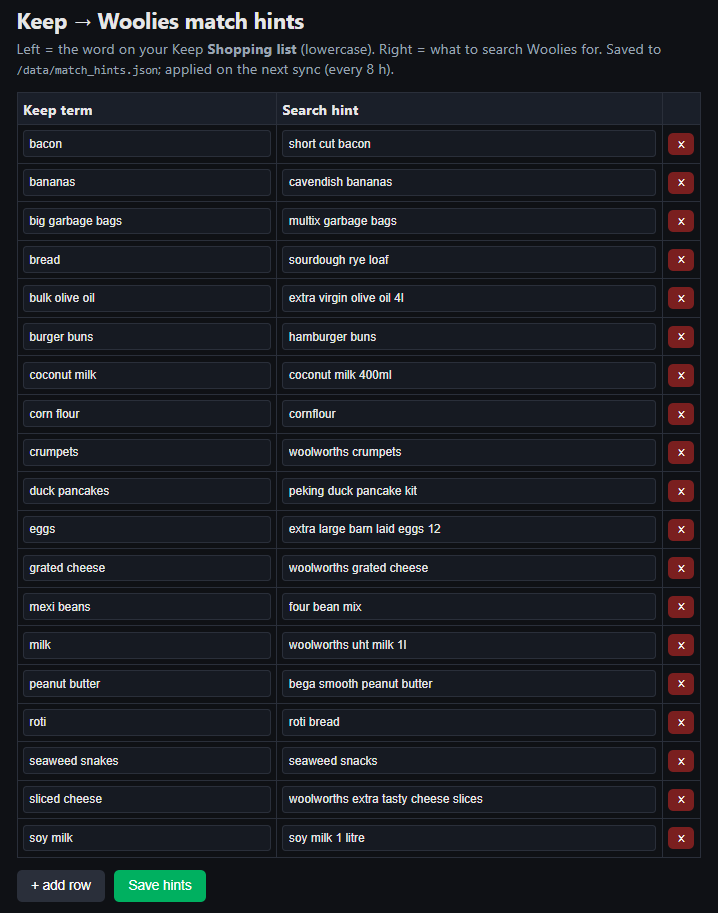
The hints editor: left is the word off the Keep list, right is what to actually search Woolies for. "Bananas" → "cavendish bananas"; "duck pancakes" → "peking duck pancake kit" (told you not to ask). Edit from my phone, hit Save, applied on the next sync.
The "sync now" button
It runs itself every few hours — but sometimes you finish adding to the list and want the trolley filled right now, before the thought evaporates. So there's a button for exactly that, sitting on the Home Assistant dashboard: Sync list → Woolies. Tap it from the wall tablet or my phone and the robot wakes up on the spot, reads the list, and fills the cart. No waiting for the next scheduled run.
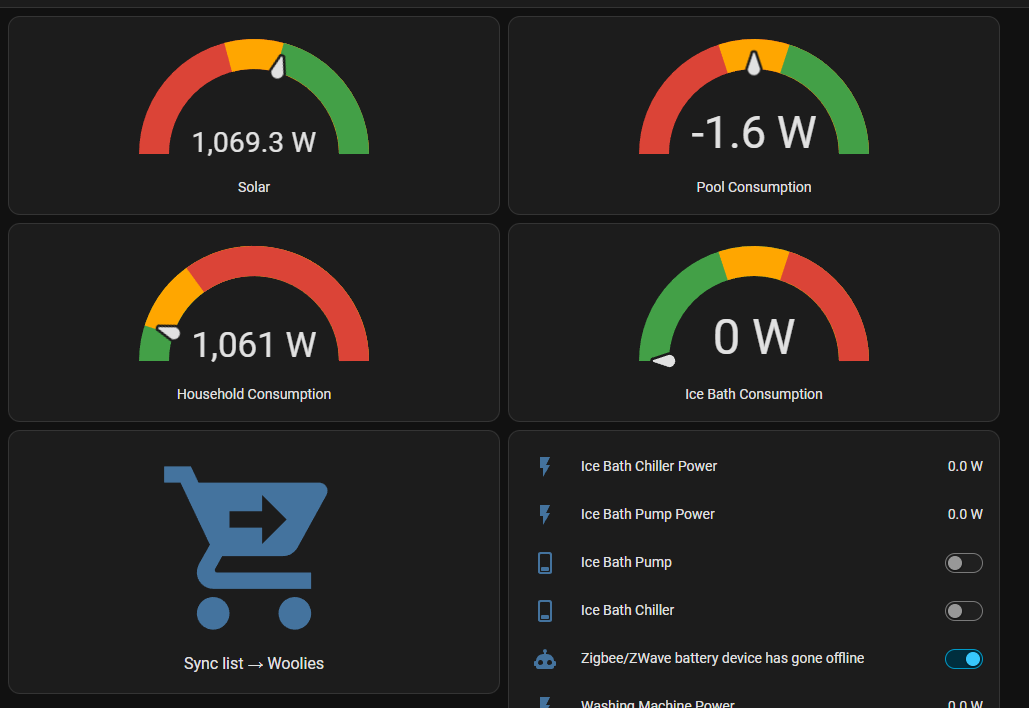
The manual trigger lives right on the energy dashboard, in among the solar and the (yes, ice bath) gauges. The shopping list automation shares a wall with the rest of the house, which feels about right.
The rules I gave it
Automation around money needs adult supervision baked in:
- It never checks out. Full stop. It fills the trolley; a human places the order.
- It refuses to act if it's not really me logged in — an anonymous session gets a hard no.
- It confirms before it deletes anything from the list.
- It runs a "dry run" by default — tell me what it would add before it adds anything.
The honest bit
This whole thing is held together with tape and good intentions. It leans on unofficial, undocumented corners of two services that owe me exactly nothing and can change a button tomorrow and break the lot. It is strictly for my own account and my own groceries — not a way around anyone's security, just a very elaborate way to avoid typing "milk" into a search box. It's almost certainly against somebody's Terms of Service. If it explodes, I get to keep both halves.
But right now my family throws things at a shared note all week, a robot quietly stocks the trolley, and on shopping day I open the app, glance at a full cart, fix the one weird match, and hit Checkout.
The list fills itself. I stopped being the list.
The dog still gets out occasionally. Different automation.
Built for personal use, on personal accounts, with a great deal of respect for the people who run those services and would very much prefer I didn't. Not affiliated with anyone. Don't @ me.
Get one of these — and a working automation — each week.
The builds, the bugs, and the YAML. No fluff.
Don't fancy the DIY?
Get Dycom Automation to do it properly.
Reading YAML isn't everyone's idea of a good night in. Dycom Automation — the grown-up, properly-insured version of all this — will design, install and tune your whole smart home for you. Same ruthless automations, none of the swearing.
Get it done by Dycom Automation →